ChatGPT ads for local businesses: Opportunity or threat?
Learn how to set up Google Local Services Ads for handymen, including verification, budget, and lead generation tips.
Marketing Dribble podcast: The biggest mistakes in local advertising and how to avoid them
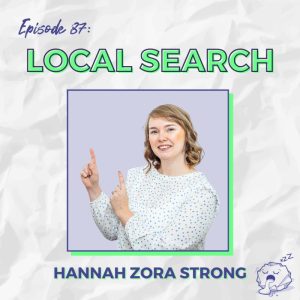 Hannah walks Rob and Jonny through the real differences between Google Ads and LinkedIn Ads, breaks down how Local Service Ads work and who they’re best suited for, and calls out the most common mistakes small business owners make when spending their ad budget. Spoiler: you’re probably wasting money somewhere.
We also get into AI; how is it changing the game for local businesses, and how you can use it to your advantage without needing a massive marketing team or budget behind you.
Whether you’re running a bricks-and-mortar shop or a service-based business trying to get found locally, the episode is full of straight-talking strategies to help you spend smarter and get better results. Listen here, or read-on below!
Local Services Ads or traditional Google Ads – which platform do I start with?
Local Services Ads (LSAs) are designed to be a straightforward, low-touch lead feeder for specific service providers. They can be setup in isolation, or used in conjunction with traditional Search ads setup within the Google Ads interface.
| Feature | Local Services Ads (LSAs) | Traditional Google Search Ads |
| Bidding Model | Pay-per-lead (CPL), not cost-per-click. | Pay-per-click (cost-per-click bidding, or smart bid strategies such as target cost per lead / maximise conversions or target ROAS / maximise revenue |
| Targeting | Uses your Google Business Profile, service selection, and radius/area. | Targets users based on keywords, demographics, and location settings. |
| Best For | Tradespeople, locksmiths, moving services, plumbers, handymen, service providers, or anyone working from home (ideally one or two-person businesses). | Businesses wanting to capture demand from specific keyword queries. |
| Lead Capture | Message or call, tracked via the Local Services Ads platform, delivering contact info straight to the business. | Requires robust conversion tracking (form fills, calls) to measure performance. |
A key benefit of LSAs is the cost-per-lead model, which is a “no-brainer” for tradespeople on a tight budget, as ads only appear when people are actively requesting that service (e.g., “plumber near me”). Cost-per-lead is determined by the demand and competition within your selected service area.
Driving Footfall for Physical Stores with Performance Max
For businesses with physical locations – especially e-commerce retailers who also want in-store visits – Google’s Performance Max (PMax) is the primary ad format to drive footfall traffic.
- Google Maps Visibility: PMax is the main format for launching ads directly on Google Maps, which is critical since modern search behavior means users no longer need to type “coffee near me” but can simply type “coffee” into Maps.
- Promoted Pins: If you open Google Maps, a square pin indicates a promoted PMax ad, while round pins are organic listings.
- Quantifying Value: PMax footfall campaigns are a “game changer” for hospitality and retail. They provide a way to see how many people searched, clicked the ad, and then visited the location, allowing the business to place a quantifiable value on the ad activity (e.g., if the business knows the average spend per person).
Caveat on Store Visit Tracking
Google is often vague on the eligibility criteria for setting up in-store tracking. Eligibility is based on having enough footfall and location data to ensure the tracking remains anonymous (full details direct from Google here). Businesses in busy city centres generally qualify faster than those in low-traffic areas like trading estates.
Critical Mistakes to Avoid
The single most costly mistake Hannah frequently sees is incorrect location settings.
“When setting up your campaign, ensure you choose “Presence only” instead of “Presence and Interest” she says.
Selecting “Presence and Interest” means your ads will show to users interested in visiting your area, not just those who are physically there. This can result in “wasted spend from around the world” and should be fixed immediately.
The Future of Local Search: AI and Conversational Results
The rise of conversational AI chatbots (like ChatGPT and Gemini) is expected to impact local search.
- Opportunity over Threat: AI is likely to introduce new ad platforms (i.e. advertisers can register their interest for ChatGPT ads here), challenging Google’s monopoly and giving local businesses more sources for leads.
- Conversational Advantage: AI handles conversational queries better than traditional search. If a user asks for the “best plumber near me” or “highly rated,” AI platforms are expected to synthesize reviews and data from multiple sources (like Trustpilot, Feefo, etc.) to provide one definitive answer, offering a more personal approach.
- Adapting: Businesses must be prepared to “move with the times” and adapt their strategy to leverage these new AI-driven platforms.
To chat to Hannah about mastering your local ad campaigns, contact her via email: hannah.zoramarketing@gmail.com

Zora Marketing Invited to Downing Street Alongside North East Female Founders
Hannah Strong, founder of Zora Marketing joined 50 female founders from across the North East for an evening with the Chancellor; all recognised for the role they are playing in building and growing businesses across the region.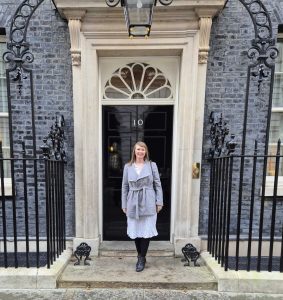
The room was crammed with world-class innovators across tech, creative industries, and professional services, but the underlying theme was that these women – through geography alone – didn’t have the same access to investment compared to other parts of the country.
As Sophie Milliken put it on the night, the barrier has never been ambition, it’s been access. That’s something that resonated across the room because it’s a reality for many founders. Hannah’s key takeaway from Sophie, Kim McGuinness, and Rachel Reeves was one of HOPE; that investment and belief in the capabilities of Northern women has been ignored for too long, but change is already afoot.
Hannah said: “There’s a huge amount of creative energy in the North East, and I love being a part of it. I’m frequently found at the North Tyneside Business Forum and Factory events, City Ladies at the Hilton in Gateshead, the North East Charity Freelancer bi-monthly co-working group, and the North East Freelance Network (the most supportive freelance community going), so I like to get out and about as much as I can!
 There is a real sense that people are building things that matter, often alongside everything else life brings. I even bumped into Abigail Reid (Merwave founder) at the event, whom I last met 4 years ago at a Whitley Bay stay’n play with our toddlers! It was proof that many women in the room are also mothers out to change the world around changing nappies. Many of these businesses are being run around school runs, client work, and day-to-day commitments, and still managing to grow. It’s not always the version of entrepreneurship that gets talked about, but it’s a big part of what’s driving the region forward.
Although I’m from the Lake District originally, I’m now an honorary Geordie, and being invited to spend the evening amongst such an esteemed group of women was incredibly inspiring. I even chatted to Kim McGuinness about this very topic – pushing for the BIPC scheme to be rolled out to Durham and Tees Valley too.”
From a Zora Marketing perspective, the message of regional potential is clear every day. Through her Experts in Residence role at the BIPC, Hannah sees first-hand how many brands are seeking access to business support to scale their operations. The focus of the BIPC is to safeguard and create new roles, and the sheer demand for both the Citylife Grants (12hrs 1:1 support with an Expert) and their local networking events (held from Northumberland to Sunderland) demonstrates just how much entrepreneurs are clambering to take advantage of North East Combined Authority opportunities.
Managing Google and LinkedIn ads for local brands and BIPC North East clients gives Hannah a direct insight into how ‘ready to scale’ these businesses are. They’re not trying to get going; they’re already scaling, already delivering results, and already building momentum.
Being invited to Downing Street reflects the quality of the businesses here, including Zora Marketing, but the real value will come from what follows: the conversations that continue, the opportunities created, and the investment in female-founded businesses that will hopefully grow from strength to strength.
Hannah gave a huge thank you to City Ladies Networking and Natalie Turner for bringing it all together, and for creating the kind of space where those conversations can happen properly.
If you’re a North East business looking to grow and want support with Google or LinkedIn ads, Zora Marketing works closely with brands at that stage, helping turn what’s already working into something that scales.
You can get in touch directly at: hannah.zoramarketing@gmail.com

How to Set Up Google Local Services Ads (5-Step Guide)
Learn how to set up Google Local Services Ads for handymen, including verification, budget, and lead generation tips.
Sold Out Offers interview: How to Work Less, Earn More, and Finally Find Peace in Your Business
You started your business for freedom, but somehow, you’ve ended up juggling client work, admin, and family life, feeling more stretched than ever. Sound familiar?
The dream of being a self-employed mother is often about having flexibility and control, but the reality can quickly become chasing a never-ending to-do list while trying to manage the school run. You want to work less and earn more—it’s the holy grail of entrepreneurship, and honestly, it’s what you deserve
The good news? It’s completely achievable, and the secret lies in one simple word: specialism.
Hannah Zora Strong, an experienced PPC (Pay-Per-Click) specialist, chatted to business coach Ceels Lockley to discuss how she built a business that delivers both profit and peace. Her journey offers invaluable lessons for any self-employed mother looking to transform their service or product into a high-value, high-efficiency machine.
Step 1: Charge for Your Expertise, Not Your Time
One of the biggest takeaways from Hannah’s experience is how she approaches pricing. She doesn’t just charge a flat day rate; her fees are calculated based on the complexity and value she brings to the client.
“From working as Head of Department at two Newcastle-based digital agencies, I knew the difference between the hourly rates that we would bill the client for an exec, a manager, a senior, head of department. So for someone with my experience, even though I charged nowhere near what an agency would charge for me, I had a good idea of what a PPC day rate was.”
For you, the self-employed mother, this means shifting your mindset. Stop charging what you think you need to live on, and start charging what your years of experience and specialised skill are worth to the client.
Your Action Plan for Higher Prices:
- Identify Your Seniority: You are not an “exec.” If you’ve been doing your craft for years, you are a “senior” or “head of department.” Price accordingly.
- Know the Benchmark: Research what large agencies or top-tier freelancers charge for your service. Even if you’re based regionally and offer “good value” compared to London rates, this knowledge gives you confidence to set a strong price.
- Price the Solution, Not the Hours: When a client comes to you, they are looking for a result. Your fee should reflect the value of that result (e.g., increased sales, a perfect website, a stress-free campaign), not the 10 hours it took you to deliver it. A specialist can deliver faster, which is a key component to working less.
Step 2: Embrace the ‘Chrysalis’ Phase and Find Your Niche
If you are currently trying to be all things to all clients, you are working harder, not smarter. This is where specialism becomes the engine for efficiency.
Hannah admits it took her the first 12 months of being in business to figure this out, using a beautiful metaphor: she was in the “chrysalis” phase, still “forming an idea of what’s good” for her. This is a crucial admission; the need to niche down never stops, but the benefits for the time-poor mother are immense.
How Niching Helps You Work Less:
- Speed and Efficiency: When you specialize – whether by industry (e-commerce vs. lead generation) or client type (B2B vs. B2C) – you gain incredible efficiencies. As Hannah says, your work becomes “faster.” You stop reinventing the wheel for every client.
- Faster Recommendations: Your industry knowledge becomes deeper. You can spot problems and offer solutions almost instantly.
- Less Time, Better Results: In the end, this efficiency translates directly into you spending less time at your desk, while still delivering superior, specialist results that justify your higher fee. It’s the ultimate pathway to working less while earning the same, or more.
Don’t be afraid to ask the big questions Hannah is currently considering: Which industries have the budgets you want to work with? What type of work feels most natural to you? The answer to these questions will be your ‘specialist zone’. The area where you achieve maximum profit for minimum input.
Step 3: Peace and Profit: The Quality-Over-Quantity Rule
When you charge premium prices and specialise, you don’t need to “take on the world.” In fact, you only need a handful of high-value clients to keep your business comfortably ticking over.
“I only need 10 clients to keep myself ticking over. So I don’t need to take on the world.”
This is the freedom you started your business for. When your pricing reflects your expertise, you stop having to chase every single lead. Your clients are higher quality, they respect your boundaries, and they are happy to pay well because they know you can deliver.
Most of Hannah’s clients come from word-of-mouth or referrals; the most organic and least time-consuming methods of client acquisition. When you are a sought-after specialist, the clients start coming to you. You stop needing to push for outbound sales and can focus your energy on what you love and, more importantly, on your family.
The journey to specialist status and true work-life integration is ongoing. Give yourself permission to be in the “chrysalis” phase. Focus on defining your value, raising your prices, and embracing the efficiencies that specialization brings. Your future is one of peace and profit.
To hear more of Hannah’s story and get her top tips on building a business that gives you peace and profit, you can listen to the full interview here: Listen to the full interview on Spotify
You can connect with Hannah online via LinkedIn (hannah-strong-ppc) or get in touch for Google Ads support and further podcast opportunities here.

Interview with Jyll Saskin Gales for PPC Zone: How to Use Google Ads to Build Your Local Business
If you run a local business, you already know the struggle — getting found by nearby customers before your competitors do. That’s where Google Ads can become your most powerful lead-generation tool.
In a recent episode of PPC Zone, hosted by Jyll Saskin Gales, Newcastle-based Google Ads specialist Hannah Zora Strong shared exactly how to structure and optimise local campaigns for real-world results.
You can watch the full interview on YouTube here, but here’s a quick guide to her top insights.
1. Structure Campaigns by Location, Not Just Keywords
It’s tempting to organise your campaigns around keywords alone, but Hannah recommends structuring them by location. Why? Because this gives you far more control.
You can direct more budget to the areas driving the most conversions — say, the branch with higher stock levels or more appointment availability. It’s also easier to tailor your ad copy and landing pages to match each location.
For instance, testing a “Newcastle plumbing services” ad against a “plumbing near me” campaign can show which message resonates best. The more specific your location targeting, the better your click-through and conversion rates tend to be.
2. Nail Your Location Settings
Under “Advanced Search” in campaign settings, you can upload postcodes or regions in bulk, or set a radius around your store. This helps ensure your ads are only shown to people who are realistically able to visit.
If you run a cooking class in Sunderland, you probably don’t want clicks from someone browsing in Glasgow. That’s where Hannah’s favourite setting comes in: “Presence only.” This tells Google to target people physically in your area, not those merely interested in it. It’s a simple switch that saves wasted spend — and frustration.
3. Make Use of Extensions
Extensions make your ads look bigger, more trustworthy, and more clickable. They allow you to showcase reviews, business hours, click-to-call buttons, and directions — all drawn from your Google Business Profile.
Hannah notes that linking your Business Profile with your Ads account (using the same email) is essential. Once connected, you’ll be able to see performance by location — including impressions, clicks, and conversions — right within your account.
4. Track Those In-Store Visits
Google’s store visit tracking helps you see how many people visited your premises after clicking your ad. While the eligibility requirements are a bit mysterious (classic Google move), Hannah’s experience suggests that multi-store brands and high-footfall locations tend to qualify faster.
If you’re spending consistently but not yet seeing visit data, hang tight — it often depends on your traffic volume and store verification status.
5. Optimise for Shop Visits (and Value Them!)
If you’re using a Maximise Conversion Value or Target ROAS bidding strategy, Hannah recommends assigning a conversion value to store visits.
For example:
If 10% of visitors make a purchase, and your average order value is £50, you can assign a £5 value per visit. This teaches Google to optimise for store visits and eCommerce conversions, instead of favouring only online sales.
6. Try Local Services Ads
For service-based businesses (think electricians, plumbers, tutors, or hairdressers), Local Services Ads (LSAs) are a brilliant option.
Unlike standard Google Ads, LSAs are pay-per-lead, not per click. They show off your reviews, service areas, and contact options, helping potential customers book or call you directly.
You can also specify your working hours so ads only appear when you’re available — ideal for busy small-business owners who actually like to sleep occasionally.
Bringing It All Together
Whether you’re a café owner looking to fill more tables, a beauty salon aiming to boost bookings, or a tradesperson keen to dominate local searches — these strategies will help you make Google Ads work harder and smarter for you.
Watch Hannah’s full PPC Zone interview on YouTube: https://youtu.be/Hdr5_4f3hIM
Need help running profitable Google Ads for your local business? Contact Hannah at zoramarketing.co.uk/contact

The Art of Juggling Motherhood and Self-Employment: How Two Freelancers Built Thriving Businesses Around Family Life
Balancing business deadlines with school runs and sick days is no small feat — yet for many self-employed mothers, it’s simply part of daily life. In a recent episode of The Salt Sessions, host Bev Salt sat down with two fellow mums in marketing — Hannah Strong, a Google Ads and LinkedIn Ads specialist from Newcastle, and Lucy Rigley, a York-based brand and web designer — to talk about the messy, magical art of running a business while raising a family.
Watch the full interview on YouTube: https://www.youtube.com/watch?v=uD6lxot9uaU&t=9s
From Agency Life to Autonomy
For both women, self-employment began as a blend of necessity and ambition.
Hannah had climbed the agency ladder to become Head of PPC, but the very week she earned the title, she discovered she was pregnant. “It was a plan,” she laughs, “but it made me reassess everything.” Missing hands-on client work and craving flexibility, she began freelancing after maternity leave. Her first client arrived while she was still pregnant — a low-maintenance account she could manage “around naps, weaning and breastfeeding.”
Lucy’s freelance journey began after redundancy from her London agency job — and a surprise pregnancy soon after. “My husband was already freelancing as a web developer, so it just made sense,” she says. “I never really had a job to go back to.” Moving to York, she built her business from scratch and has now freelanced for 15 years.
Both stories echo a familiar theme: motherhood didn’t end their careers — it reshaped them.
When the Kids Crash the Zoom Call
Every working mum knows chaos can strike mid-meeting. “It never stops,” says Hannah. “Just last week my son refused to go to bed during a client Zoom call, so he ended up on my knee waving at everyone.” Thankfully, clients are generally understanding — especially those with children themselves.
Lucy recalls the lockdown years as her toughest test: “I was home-schooling two kids while working part-time for the council. My parents would FaceTime one child to keep him on track while the other… wasn’t doing quite as much as I thought!” Since then, she says, there’s been a huge shift towards empathy and flexibility.
Finding the Elusive Work-Life Balance
Both women agree that boundaries are a constant battle. Lucy’s husband often scolds her for “checking emails after hours,” but she admits that’s when she feels most productive. “I like the flexibility — if I go to the gym one morning, I don’t mind working in the evening.”
Hannah, meanwhile, works from a garage-turned-office that also doubles as a playroom. “It doesn’t have a radiator or a window, so I’m campaigning for a garden office with natural light by 2025,” she jokes. Her goal: a space that signals “Mum’s at work — do not enter (unless it’s an emergency or biscuits are involved).”
Time Management, Tools, and Staying Sane
When it comes to productivity, their styles differ. Lucy admits she’s “a go-with-the-flow creative,” relying on a fleet of notebooks and spreadsheets instead of rigid time blocking. Hannah, on the other hand, is a self-confessed time-tracking nerd. “I log everything — even toilet breaks,” she laughs. “It helps me see where I’m under-servicing clients or overworking myself.”
Both champion virtual co-working for accountability and connection — something that’s especially valuable when the “colleagues” at home are under five and sticky-fingered.
Building a Support Network
Freelancing can feel lonely, but community makes all the difference. Lucy credits Mums in Marketing for providing support and referrals: “It’s brilliant being around women who just get it.” Hannah agrees — and says partnerships with agencies have been key to steady income: “They handle contracts and reporting; I just plug in my PPC expertise. It’s a great balance.”
Both women also rely on their husbands, who work in the same industry, for daily debriefs and reality checks. “It’s like having an in-house business coach,” says Hannah.
The Downsides: Holidays, Hustle and Headaches
Flexibility doesn’t mean freedom. Holidays, for example, are rare luxuries. “If I take two weeks off, I’m basically paying to be on holiday,” admits Be. Hannah’s solution? A working holiday with her daughter through Boundless Life, a digital-nomad programme offering school, co-working space and accommodation abroad. “It gave us the best of both worlds — I worked while she made pasta in class. Win-win!”
Lucy’s biggest challenge is unpredictable income: “I work project-to-project, so I can’t rely on monthly retainers. You don’t want to turn down work before a holiday in case nothing’s waiting when you get back.”
Lessons from the Freelance Frontline
Hannah’s top tip? “Say yes to everything at first — then learn what to say no to. You only find your niche through experience.” She also recommends raising rates annually and using job alerts to pitch yourself as a stopgap consultant for companies hiring full-time roles.
Lucy adds: “Surround yourself with cheerleaders who understand your world. And collect LinkedIn recommendations — they’re digital gold.” Her final word of wisdom? “Don’t chase perfection. You’ll always feel guilty about something — so just do your best and go with the flow.”
Small Habits, Big Impact
For Hannah, a daily walk doubles as a “lunch-and-learn” session, combining fresh air with podcasts about Google Ads. Lucy swears by regular gym trips to clear her head: “You come back energised — and slightly smug.”
Both prove that freelancing and motherhood might be chaotic, but with creativity, community and caffeine, it’s entirely possible to thrive in both worlds.
For web design support > find Lucy at: https://www.lucyrigley.co.uk/
And for Google Ads management > contact Hannah here
Prefer to watch this interview? Watch the full interview on YouTube: https://www.youtube.com/watch?v=uD6lxot9uaU&t=9s

We Built This Business interview: How to Get More Local Customers with Google Ads
Hannah Zora Strong, PPC specialist and founder of Zora Marketing, joined the We Built This Business podcast to share how small businesses can use Google Ads to attract local customers and turn clicks into loyal buyers. Watch the full interview: https://www.youtube.com/watch?v=cOWVjWvDsNU
Here’s what she had to say.
About Zora Marketing
After leading PPC teams at several North East digital agencies, Hannah launched Zora Marketing to help brands take a smarter, more strategic approach to paid advertising.
“When I became a manager, I realised how much I missed being hands-on — working directly with clients, running campaigns, and seeing the numbers move. That’s what inspired me to start my own business.”
Zora Marketing now works with e-commerce stores, local retailers, service-based businesses, and councils to deliver high-performing Google Ads campaigns that increase leads, sales, and brand visibility.
Building a Local Google Ads Strategy
If you run a High Street shop, e-commerce business, or service-based company, Google Ads can help you attract customers both locally and nationally.
“A lot of my clients have a physical store but also trade online. The key is to combine different Google Ads campaign types so you’re visible wherever your customers are searching.”
1. Optimise Your Product Feed
For retailers running Shopping or Performance Max campaigns, Hannah stresses the importance of an optimised feed:
- Use clear, keyword-rich titles and product descriptions.
- Include all product attributes: colour, size, brand, material.
- Add high-quality images (your own photos work best).
“Think of it like giving Google ammunition — the better your data, the better your visibility.”
2. Use Local Inventory Ads to Drive Footfall
Want to get people off their phones and into your shop? Try Local Inventory Ads.
“If someone nearby searches for ‘vinyl flooring’ and you have it in stock, your ad can appear with a tag like ‘1.1 miles away’. It’s an amazing way to turn local intent into in-store visits.”
These ads link your real-time stock levels with Google Merchant Centre so customers can see what’s available before they visit.
3. Adapt to Changing Search Behaviour
Google’s become a mind reader.
“You no longer have to type ‘coffee shop near me’. Just search ‘coffee shop’ and Google automatically shows local options based on your GPS.”
That means you can bid on broader terms while still reaching local customers. Tools like Keyword Planner can help you identify search volumes in your town, city, or postcode.
Targeting the Right People in the Right Places
Local campaigns can target customers:
- Within a specific radius (e.g. 5 miles around your store)
- By postcode (perfect for councils or community marketing)
- By town, city, or county for wider catchments
“We work with opticians where people are happy to travel further, so we widen the targeting. But for cafés, salons or gyms, a small radius often performs better.”
Measuring Success: ROAS, CPA and Lifetime Value
One of the biggest questions small business owners ask is: “How do I know if my Google Ads are working?”
“Understand your margins. High-margin and low-margin products should have different ROAS targets. The smartest retailers set different campaigns for each.”
She also highlights the importance of customer lifetime value (CLV):
“You might lose £2 on a first sale, but if that customer spends £500 with you over five years, that’s a brilliant return. Sometimes it’s worth accepting a short-term loss for long-term gain.”
Case Study: A National Opticians Group
Hannah managed campaigns for a UK-wide opticians chain with 50+ practices.
“We use a cookie-cutter structure across all locations but tailor copy, radius size and budgets for each. If one branch expands or adds capacity, we can increase ad spend to drive more appointments right away.”
This approach keeps campaigns agile — scaling up or down based on real-time business needs.
AI in Google Ads: Friend, Not Foe
Artificial Intelligence has been in Google Ads for years — from smart bidding to automated ad copy.
“AI makes setup faster, but not perfect. You still need human oversight to make sure your money’s being spent wisely.”
Tools like Google Product Studio can now generate or enhance product images automatically — ideal for testing different visuals.
“AI helps speed things up, but strategy still needs a human brain behind it Product Studio is great for small retailers who don’t have the time, budget or energy to spend on seasonal re-shoots. For example, I work with a Candle client, and we easily swap background images between a snowy festive scene, love-heart confetti, sandy beaches and autumn leaves depending on the holiday season.”
Common DIY Mistakes
“Within campaign settings > Location options you’ll find a choice between “Presence” targeting (this shows ads based on where the searcher is) or “Presence and Interest” (showing ads based on where the user is PLUS locations they’re recently interested in). The former is usually recommended, otherwise you’ll gain clicks from users interested in visiting your location in the short-term, as opposed to those who live and work there. Great for tourism and hospitality brands. Poor for local services such as plumbers, opticians, gardeners.
If you’re managing your own Google Ads, get an expert audit. It’s far cheaper than fixing a blown budget later.
Final Thoughts
“Google Ads is one of the most measurable and flexible ways to grow your business — but it’s not set-and-forget. The best results come from refining, testing, and learning continuously.”
With the right targeting, data, and creativity, Google Ads can help you generate more leads, boost revenue, and drive loyal customers both online and offline.
Prefer to watch this interview? View on YouTube
Ready to Grow Your Business with Google Ads?
If you’re a marketing manager or small business owner looking to:
✅ Attract more local customers
✅ Improve your Google Ads ROI
✅ Drive more sales and footfall
Get in touch with Zora Marketing for a free consultation or connect with Hannah Zora on LinkedIn.

Cracking the Code of Local PPC: Expert Insights from Hannah Zora Strong
Running local PPC campaigns can feel like juggling fire. Each city behaves differently, budgets are tight, and clients want results fast. For Hannah Zora Strong, founder of Zora Marketing and a Google Ads specialist in the UK, success is about strategy, not luck.
With more than twelve years in paid media, Hannah has managed budgets from £2,000 to £100,000 across e-commerce, retail, and lead generation. Her mission is simple: help local and multi-location businesses grow with smarter advertising. In a recent interview with Aarti Bhanushali from Swydo, she shared how to win at local PPC without burning through the budget.
Local isn’t copy and paste
One of the biggest mistakes in local marketing is assuming what works in one city will work everywhere.
“You can’t just copy campaigns between locations,” Hannah explains. “London behaves differently to Northumberland. Demographics, competition, even travel habits change everything.”
When managing 50 branches for an opticians group, Hannah focused on the 20 stores that struggled most. By adjusting radius targeting, ad copy, and bidding for each area, she uncovered what clicked locally. Inner-city stores thrived with family-focused messaging. Rural branches needed wider targeting to reach people willing to travel.
The lesson? Test, tailor, repeat. Local PPC success lives in the details.
Start with your Google Business Profile
Before you run a single ad, Hannah says to check your Google Business Profile.
“Your business profile and Google Ads work hand in hand. Keep it updated with strong reviews, quality photos, accurate hours, and the right categories,” she says.
Linking your profile to Google Ads unlocks extra insights. You can track store visits, impressions, and even how ads drive footfall. That data helps businesses understand the real-world impact of online campaigns.
How to stretch smaller budgets
Smaller budgets can still get big results if you plan carefully.
“We don’t need to do everything at once,” Hannah says. “Start small, find what works, and scale from there.”
Her advice: test one service across multiple locations or one location across multiple services. Use the data to find the best performer, then invest more there. It’s simple, safe, and efficient.
Hannah also champions Local Services Ads (LSAs) for trades, health, and service businesses. “Wherever LSAs are available, use them,” she says. “You pay per lead, not per click, and they often sit at the very top of Google results.”
She adds a warning, though. “Make sure your conversion rate supports the cost per lead. Otherwise, you could end up paying more than you earn.”
Balancing quick wins and brand building
Every business owner wants fast results. Hannah understands that pressure but insists the long game matters too.
“I always start with revenue-driving campaigns first. Once clients see consistent profit, we set aside a small part of the budget for creative or brand-building ads.”
Tracking tools like view-through and assisted conversions help prove the value of awareness campaigns. “They may not drive sales immediately, but they keep your brand front of mind. That’s what pushes people back to buy later.”
Staying ahead of Google’s constant changes
Google Ads changes every week, but Hannah doesn’t panic.
“The fundamentals don’t change. Strategy, targeting, and intent always come first. The new tools are just extras.”
She keeps up through industry podcasts, newsletters, and a strong LinkedIn network. Her top picks include Inside Google Ads by Jyll Saskin Gales, and Jeremy Young’s Google Ads Unleashed.
“I only test new features if they help my clients. Shiny new tools are exciting, but not always useful.”
Hannah’s rapid-fire tips for better local PPC
- Fix slow campaigns: Check your location settings. Always choose “presence” instead of “presence and interest”.
- Best for local leads: Retargeting beats cold traffic every time.
- Lesson as a solo agency owner: Growth doesn’t always mean hiring. “I like working one-to-one with clients. They get my expertise directly.”
The next big opportunity in local marketing
Hannah believes Local Services Ads are still underused. Many agencies focus on large accounts and overlook smaller trades or one-person businesses.
“LSAs are perfect for local service providers like plumbers, roofers, and electricians,” she says. “The setup is simple, and you only pay when someone contacts you. It’s a huge opportunity.”
Watch the full interview
Hannah’s full chat with Aarti Bhanushali from Swydo goes even deeper. They discuss tracking offline conversions, optimising for store visits, and managing campaigns across multiple regions.
Watch the full interview here: https://youtu.be/nYGLADsriq0
If you run local or multi-location campaigns, this conversation is packed with insights from one of the UK’s most experienced PPC specialists. Grab a brew, tune in, and learn how to make every click count. Or if you’re seeking support with your local ad campaigns, contact Hannah.

How to Use Google Ads Lead Generation for Local Businesses
Google Ads lead generation local tips
Want better results from local lead generation? This guide shows how to set up Google Ads campaigns that bring in local leads, track results, and target only the areas that matter.
When it comes to Google Ads for local lead generation, the biggest question I get asked is: should I structure my campaigns by location or by keywords?
Naturally, I’m going to say location, and here’s why it works so well for lead generation campaigns.
Why Location-Based Campaign Structure Works for Lead Gen
If you’re running a service-based business with multiple locations, structuring by location gives you complete control over where your budget goes.
Let’s say you’re running dental practices across three cities. One location might have higher capacity for new patients, while another might be fully booked for months. With location-based campaigns, you can allocate more budget to the practice that actually needs new patients.
The same applies if you’re a solicitor with offices in different areas. Competition levels vary wildly between inner city locations and rural areas, so your cost-per-acquisition will be completely different.
Location-based structure lets you set realistic expectations and budgets for each area.
Campaign Setup Essentials
Location Settings Start with presence-only targeting. If you run cooking classes in Manchester, you don’t want to show ads to someone in London who once searched for “things to do in Manchester.” You want people who are actually in Manchester and can attend your classes.
For service-based businesses, set a radius around each location. If you know your customers typically travel 15 miles to reach you, set that radius to optimise your campaigns accordingly.
Location Assets (Extensions) Connect your Google Ads account to your Google Business Profile. This is non-negotiable for local lead generation. Once connected, you’ll get your address featured in Search ads to local Googlers.
The data you get back is incredibly valuable too. You can see clicks, impressions, click-through rates, and conversions broken down by each location, so you know exactly which areas are performing best.
If you’re aiming to get more Google Ads local leads, this structure gives you full control over spend by area.
Dynamic Location Insertion: Your Secret Weapon
This is my personal favorite feature that I don’t see used enough. Dynamic location insertion uses GPS data to automatically insert the user’s city or town name directly into your ad copy.
Instead of creating separate campaigns for “Plumber in Newcastle,” “Plumber in Gateshead,” and “Plumber in Sunderland,” you can create one campaign with dynamic insertion. Google will automatically show “Plumber in Newcastle” to someone in Newcastle and “Plumber in Gateshead” to someone in Gateshead.
The click-through rate improvement is remarkable because people see hyper-local relevance without you managing dozens of campaigns.
Testing Landing Pages for Better Conversions
Here’s where location-based structure really shines for lead generation. You can A/B test whether to send users to:
- A location-specific page with opening times, local staff, and contact details
- A service-specific page focused on the service they searched for
I’ve got one client where we tested exactly this. The location-specific landing page had a 23% higher conversion rate because people could immediately see local information and felt more confident about contacting a local business.
Local Services Ads: The Game-Changer
For service-based businesses, Local Services Ads are revolutionary because you pay per lead, not per click.
These appear at the very top of search results with “Google Guaranteed” badges. Users can contact you via email, WhatsApp, or text message directly from the ad.
Setup Requirements:
- Insurance documents (Google needs to verify you’re legitimate)
- Business registration
- Connected Google Business Profile
- Customer reviews (automatically pulled from your profile)
- Weekly budget (not monthly)
Optimisation Tips:
- Add high-quality photos of your work
- Set realistic working hours (your ads only show when you’re available)
- If you’re an emergency service like a locksmith, consider 24/7 availability
- Use your existing search campaign CPA as a benchmark for target cost-per-lead
The beauty of Local Services Ads is the simplicity. There are no keywords to manage, no bid adjustments to make. You tell Google what services you offer and where you cover, and they handle the rest.
Search ads: Measuring Success Beyond Conversions
Don’t forget to look at assisted conversions and view-through conversions. Someone might click your ad on mobile while they’re out, then call you later from their landline at home. That phone call won’t show up as a direct conversion, but your ad still influenced it.
If you’re tracking phone calls, make sure you’re using Google’s call tracking or Google forwarding numbers so you can properly attribute phone leads back to your campaigns.
Budget Allocation Strategy
Start with equal budgets across locations, then adjust based on performance and capacity. If your Birmingham location is converting at £45 per lead while your London location is at £85 per lead, but Birmingham is fully booked, shift the budget to London.
Also consider seasonality by location. A coastal tourist area might need higher budgets in summer, while a business district might perform better during term time.
Real-World Google Ads for Local Lead Generation Success
I worked with a nationwide Opticians group who had over 50 practices around the UK.
Strategy:
- Used live appointment data to fluctuate budgets according to practice capacity
- Restructured campaigns for local lead gen by location (instead of by keyword)
- Campaigns optimised for appointment bookings
Results after six months:
- 872% more conversions
- 79% lower CPA
- Became the most-visible opticians in target neighbourhoods
The key was consistent messaging about appointment availability, backed by sustained investment in the right geographic areas.
Then, the best way to scale your Google Ads campaigns is to understand your target CPA per location – which may be based on capacity, store costs (i.e. rent, staffing, etc), services offered, and competition levels.
This approach works across sectors. If you’re looking to scale using Google Ads for local lead generation, it’s the fastest way to match demand with real capacity on the ground.
For more insights, visit our Knowledge Hub for practical digital marketing tips.
Further reading: Google Ads Support
Google Ads lead generation local campaign
