Google Ads local footfall tips
Learn how to use Google Ads to increase local footfall, track store visits, and bring more customers through your doors.
Getting people through your door is often more valuable than online conversions, especially for restaurants, retail stores, and service businesses where the real magic happens face-to-face.
Google’s store visit tracking and footfall optimisation tools have transformed how we measure and optimise for physical visits. Here’s how to set up campaigns that actually get people to your location.
Understanding Store Visit Tracking
Store visits are tracked when someone clicks your ad or views your video, then visits your physical location. This uses GPS data from users who have location services enabled and have visited Google Maps.
The attribution is crucial to understand: visits are attributed to when the click happened, not when the store visit occurred. If someone clicks your ad on Friday evening but visits your store on Saturday morning, that visit shows up in Friday’s data.
This matters for your reporting. Always look back at previous days and weeks to capture delayed store visits, especially for weekend businesses or appointment-based services.
Eligibility: The Mysterious Requirements
Google is deliberately vague about store visit eligibility requirements. There’s no minimum spend, minimum clicks, or minimum number of locations that guarantees approval.
What You Control:
- Verified Google Business Profile with postcard verification
- Google Ads account linked to your Business Profile
- Location assets enabled in your campaigns
What Google Controls:
- Status updates every 24 hours
- Data threshold requirements (undisclosed)
The Real Requirements: Based on my experience, Google needs enough foot traffic data to make visit tracking anonymous. This means:
- High street locations perform better than industrial estates
- Shopping centres and town centres qualify more easily
- Multiple locations increase your chances significantly
- Tourist areas and busy districts have advantages
I’ve got one client spending £10k+ monthly for over a year, but because they’re on a quiet trading estate with low natural footfall, they still haven’t qualified. Meanwhile, a coffee shop spending £500 monthly on a busy high street qualified within three weeks.
It’s frustrating, but location matters more than ad spend for store visit eligibility.
Campaign Setup for Maximum Footfall
Location Targeting Strategy Set tight radius targeting around each store location. If you know customers typically travel 5 miles to visit you, set a 7-mile radius to account for people who might travel slightly further.
Use presence-only targeting, not presence and interest. You want people who are actually in your area and can physically visit, not tourists planning future trips.
Ad Extensions That Drive Visits Location assets are essential, but don’t stop there:
- Call extensions for directions and questions
- Sitelink extensions to specific store pages
- Promotion extensions for in-store offers
- Price extensions for your main products/services
Landing Page Strategy Send traffic to location-specific pages, not generic service pages. Include:
- Exact address with embedded Google Maps
- Opening hours prominently displayed
- Phone number for easy contact
- Parking information
- What to expect when they visit
- Current promotions or offers
Performance Max for Store Visits
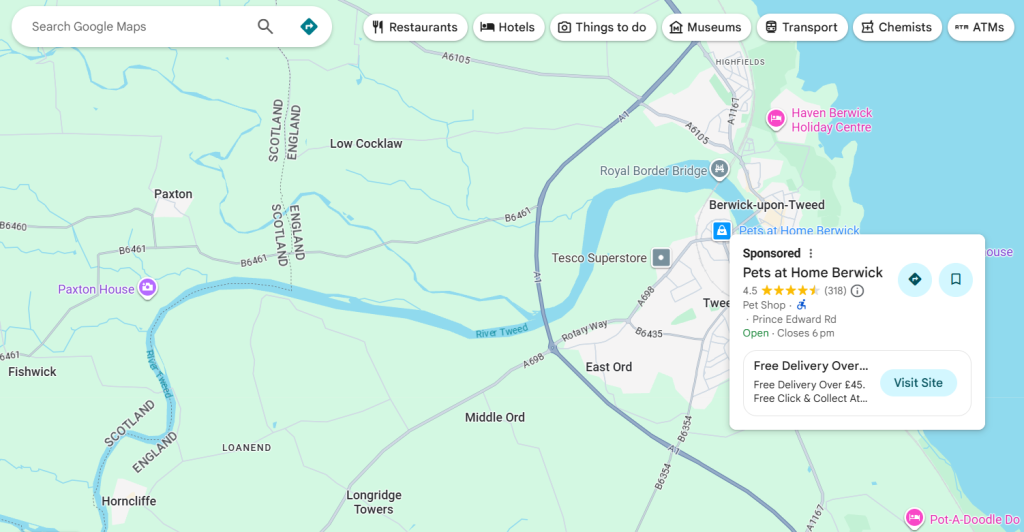
Performance Max campaigns can optimise specifically for store visits, giving you those promoted pins on Google Maps.
When someone searches for businesses like yours in your area, your location appears with a branded square pin. Clicking it shows your opening times, offers, photos, reviews, and directions.
Set up your Performance Max asset groups with:
- High-quality storefront and interior photos
- Headlines that mention your local area
- Descriptions highlighting your in-store experience
- Local landing pages with store information
The key is telling Google that store visits are your primary goal, not just online conversions.
Setting Store Visit Values
If you’re using Target ROAS or Maximize Conversion Value bidding, assign monetary values to store visits. This is crucial for proper optimisation.
Calculate this using your conversion data:
- Track how many store visitors make purchases (footfall counters help)
- Calculate average in-store transaction value
- Multiply: visit-to-purchase rate × average transaction = store visit value
Example: If 20% of visitors purchase and your average sale is £40, set store visit value at £8.
Without this value, Google’s algorithm might ignore store visits in favour of online conversions, even if store visits are more valuable to your business.
Dynamic Location Insertion for Footfall
This feature automatically inserts the user’s city or town name into your ad copy using GPS data. Instead of creating separate campaigns for each nearby area, one campaign with dynamic insertion serves hyper-local ads.
The click-through rate improvement is significant because people see ads that feel specifically created for their exact location, not just the general area.
Local Promotions and Events
Footfall campaigns work brilliantly for driving traffic to specific events or promotions:
Time-Sensitive Offers: “Visit our Manchester store this weekend for 30% off winter stock” Use ad scheduling to show these only during relevant times.
Store-Specific Events: Grand opening promotions, seasonal sales, or special demonstrations benefit from dedicated footfall campaigns with increased budgets during event periods.
Inventory Clearance: If one location has excess stock, create a footfall campaign specifically for that store with attractive clearance messaging.
Measuring Beyond Store Visits
Store visit tracking only captures users with location services enabled, so it’s always underreported. Look at these additional metrics:
Assisted Conversions: How many online conversions were influenced by users who also visited your store?
Cross-Channel Attribution: Are people clicking ads, visiting stores, then purchasing online later?
Phone Call Tracking: Store visits often generate phone calls for directions, opening times, or product availability.
Brand Search Increases: Successful footfall campaigns often drive increases in branded search volume as people remember your business.
Seasonal and Local Event Optimisation
Adjust your footfall campaigns around local events and seasonal patterns:
- University towns: Higher budgets during term time, lower during holidays
- Tourist areas: Seasonal adjustments for peak visitor periods
- Business districts: Higher budgets weekdays, lower weekends
- Shopping centres: Increased budgets during school holidays and weekends
Competitive Advantages for Footfall
Local businesses have unique advantages over national chains:
Personal Service: Highlight the personal attention customers receive in-store
Local Knowledge: Emphasise your understanding of local needs and preferences
Community Connection: Show your involvement in local events and causes
Immediate Availability: Promote same-day service or immediate product availability
Getting Started with Footfall Campaigns
- Verify Your Locations: Ensure all Google Business Profiles are verified and optimised
- Link: Connect your Google Ads account to Business Profile Manager
- Enable Location Assets: Turn on location extensions for all campaigns
- Set Tight Targeting: Use presence-only targeting with appropriate radius
- Create Local Landing Pages: Store-specific pages with visit information
- Track Phone Calls: Many store visits start with phone calls for directions
- Be Patient: Store visit eligibility can take weeks or months depending on location
Remember, store visit tracking will always underreport actual visits, but it provides valuable directional data for optimisation. Focus on the trends and relative performance between locations rather than absolute numbers.
The goal isn’t just getting people through your door once – it’s creating customers who return because of the great experience your physical location provides. Google Ads gets them there; your in-store experience keeps them coming back.
For more insights, visit our Knowledge Hub for practical digital marketing tips.
Further reading: Google Ads Support